No Honey, We Have a Dashboard at Home
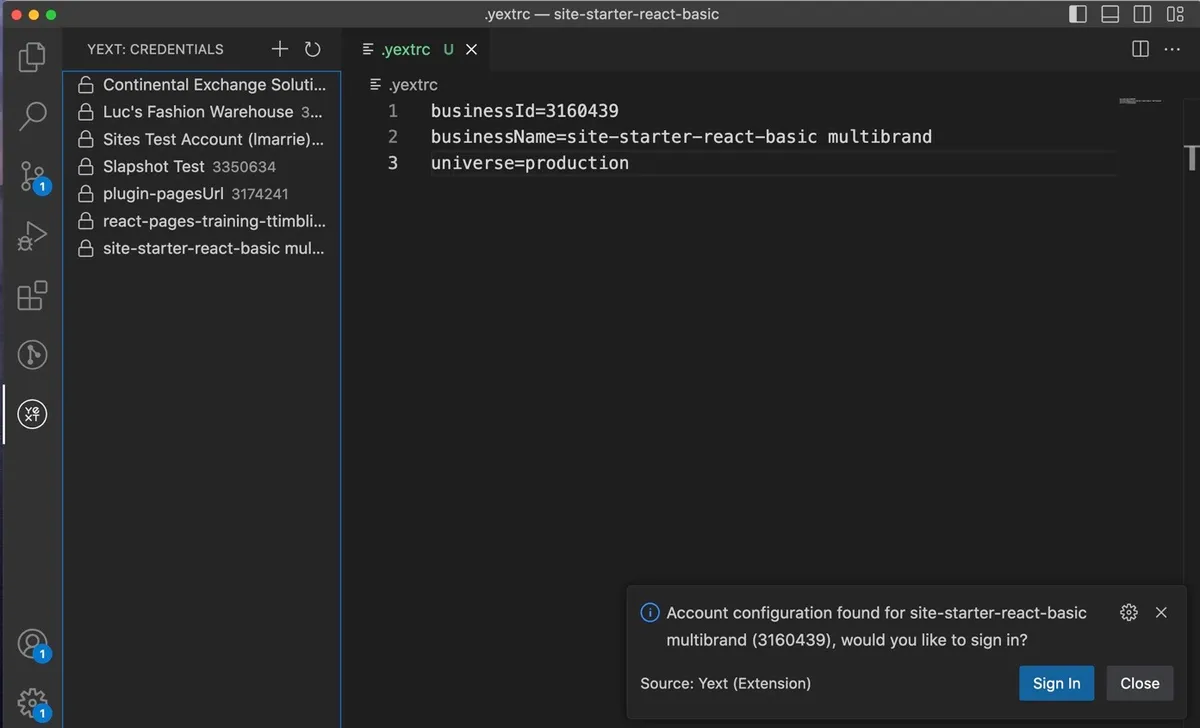 A few years back (2022) at Yext, I built a VS Code extension that gave our developers multi-tenant auth right inside the editor. See all your accounts in the sidebar, switch between them through the UI, and sync data down to your machine for local development. The vscode API was so nice I became a hammer looking for a nail.
I kept thinking about how far we could push it. If the extension can authenticate you and pull from your data stream, why can't it show your data? And if it can show your data, why can't you edit it right there? Yext is a database company. Could the VS Code extension reach feature parity with our platform's UI? The answer kept looking like yes.
Then I went to Fisker, and the model fit even better.
Our internal dashboard for managing vehicles was a create-react-app web app. Features were slapped on where the API developer thought best (there's no designer in the room). At some point somebody added a tab component and now the main detail page has 10. You should have seen the React code the embedded systems guys were adding. The page was a mess, and organizing it would take away from the core work — by the time you untangled all the features, new ones would give you a nasty merge conflict anyways.
But strip away the UI chaos and look at what it actually did: list cars, display a digital twin, run actions like unlock or OTA update, tail vehicle signals. Every one of those is a problem VS Code already solved. A list of cars is a tree view in the sidebar. A digital twin is a document in the editor. Actions are commands in the palette or buttons in the title bar. Tailing signals? That's literally just a terminal.
No separate frontend. No separate deploy pipeline. No separate auth system. Just an extension in the app we were already using every day.
Now I already confessed my bias — the VS Code extension API is genuinely excellent to work with. But the pattern I keep seeing is real: internal tools teams spend months building dashboards that are worse versions of things VS Code already provides out of the box. File trees, search, tabs, terminals, side panels, command palettes, keyboard shortcuts. It's all just sitting there.
If your users already have VS Code open — or wouldn't mind installing it — you skip the entire frontend stack and let your team focus on the customer-facing work that actually needs a custom UI. At Fisker, if we'd gone this route, that's engineering effort back on the stuff our actual customers would see and touch.
Next time you're speccing out a dashboard, take a serious look at whether VS Code gets you there. I bet it gets you further than you'd expect.